AI Trading Coach: Meet Pace, Live Nudges & Achievements
Meet Pace
Pace is your AI trading coach. He learns what works for you from your own trading history, then helps you stick to it: a nudge while you trade (or a debrief afterwards, depending on your plan), achievements as you build good habits, and a monthly report on how it all went.
Pace is not a signal service and never tells you what to trade. He compares today against your own history — your best hours, your usual trade count, your usual size, your typical winning and losing day — and speaks up when a session starts drifting away from the way you trade when you do well.
The first time you sign in, Pace introduces himself in a short popup. After that you'll see him in Tips from Pace at the top of each page, which you can dismiss with Got it.
The AI Coach page
Open AI Coach in the sidebar (under Performance). The page has five tabs:
| Tab | What's there |
|---|---|
| Insights | Where you trade best — the baseline every nudge is measured against |
| Achievements | What you've unlocked, and your progress toward what's next |
| Reports | Your monthly report and every past month |
| Coach History | Every nudge Pace has sent you |
| Settings | What Pace watches for, auto lockout, and Pace's on/off switches |
The tab you're on is part of the page address, so you can bookmark or share a link straight
to one (for example /coach?tab=settings).
Where you trade best
The Insights tab shows your baseline: your best trade count per day, your best hours, your typical green and red day, and how many trades you usually take. It's built from your synced trades, so it gets sharper as more of your history lands in Echo Trader.
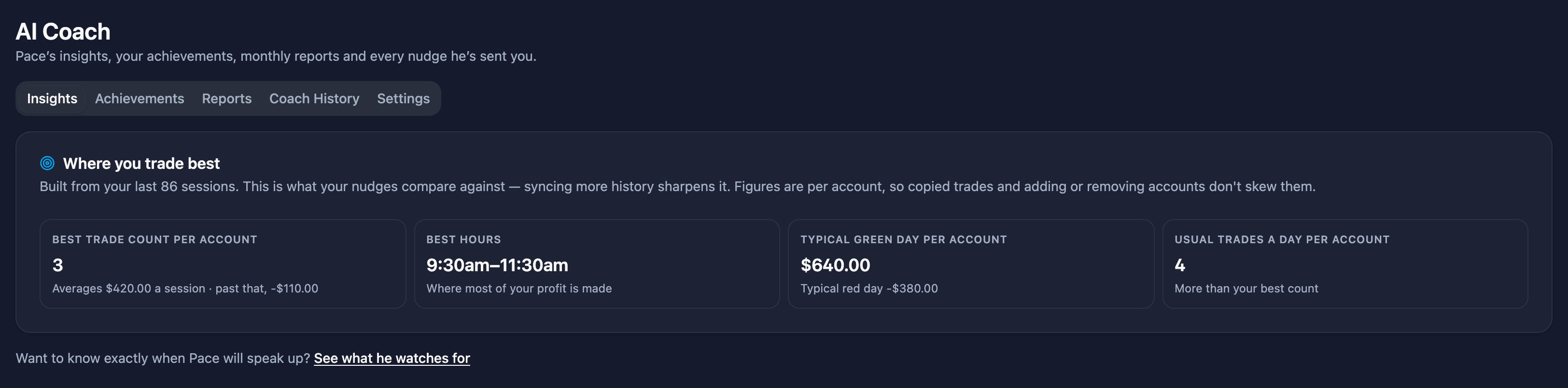
Pace stays quiet on pattern-based nudges until he has enough history to be honest about your patterns:
| Claim | Needs |
|---|---|
| "You trade best when…" patterns | 20 trading days |
| Your best time of day | 30 trading days |
| Your best trade count ("you do best on 2 trades a day") | About 60 closed trades |
If the Insights tab looks thin in your first weeks, nothing is broken — Pace is waiting for enough data to stop guessing. Syncing older orders counts, and is usually the fastest way there. Achievements and encouragement don't need a baseline, so those start right away.
What Pace watches for
Open AI Coach → Settings to see exactly when Pace will speak up — in your own numbers, not generic advice. Each kind of nudge has its own row with the trigger and an on/off switch. In plain terms:
| Nudge | Pace speaks up when… |
|---|---|
| Tilt warnings | A losing run is unusual for you (Pace works out what "unusual" is from your own win rate) and the day's loss is bigger than your typical red day |
| Revenge trading | You get straight back in after an unusually large loser |
| Overtrading | You go past the daily trade count you do your best work on — gently first, more firmly if it keeps going |
| Position sizing | You're trading noticeably bigger than your usual size |
| Time of day | You're trading outside the hours where you make most of your money |
| Drawdown | Today is getting close to your worst day on record |
| Protecting a green day | You're up as much as a typical good day — a reminder that it might be one to bank |
| Encouragement | After a rough session or a longer-than-usual losing run, with the bigger picture |
| Recognition | You finish green while staying inside the pattern that works for you |
A row marked Still learning tells you how much more history Pace needs for it. A row marked Copier plans is a live-only nudge your plan doesn't include (see Live nudges or a debrief).
Turn off any row you don't want — muting one kind of nudge never affects the others.
Setting your own numbers
On paid plans (Journal Pro, Basic and Premium), you can replace Pace's number with your own. Each row with a number shows it as a sentence you edit directly, then click Save:
| Nudge | Your number |
|---|---|
| Overtrading | Nudge me after 5 trades a day — a check-in on your 6th trade, a firmer warning at double |
| Tilt warnings | After 3 losses in a row |
| Revenge trading | Within 5 min of a loss bigger than $300 |
| Position sizing | When a position is above 4 contracts |
| Drawdown | When I'm down $500 on the day |
| Protecting a green day | When I'm up $1,000 on the day |
| Time of day | My trading hours are 9:30am to 11:30am ET |
- Your number replaces Pace's. Under each row you'll see Pace's suggestion, based on your history, and a Reset link that goes back to it. After a reset, the row follows Pace again as he learns.
- It works right away, even before Pace has enough history to suggest a number himself.
- Any number is allowed. If it's well above what you usually do, you'll see a note that Pace will rarely speak up at that level, but it still saves.
- Dollar amounts and trade counts are per account when you trade several accounts at once, the same as Pace's own numbers.
- Tilt with your own number fires on the losing run alone. Pace's version also waits for the day's loss to be unusually large.
- On Journal Pro, your numbers are what your after-session debrief grades you against ("you set 4 trades, you took 7"). Tilt, revenge, drawdown and green-day rows are live-only, so they aren't editable there.
- Free uses Pace's numbers. If you move to Free, your numbers are kept and come back when you upgrade again.
When your own number fires a nudge, the nudge says so ("past the 4 trades a day you set for yourself").
Different settings for each Echo group
On Basic and Premium, each Echo group can have its own numbers. That's useful when you trade an evaluation one way and a funded account another. Use Settings for at the top of What Pace watches for:
- All accounts is where your everyday numbers live. They apply everywhere unless a group has its own.
- Pick a group to see the same rows for that group. Change a number and click Save, and it applies to that group only. Anything you don't change says Same as All accounts and keeps following it.
- Turn a nudge off for one group with that row's switch. Pace keeps watching for it on your other accounts. Turning something off under All accounts turns it off everywhere.
- Use All accounts' number under a group's row takes it back to following All accounts.
- Under All accounts, a row tells you when a group does it differently ("Apex has its own number · off for Topstep").
- Accounts that aren't in a group are listed too, so each can have its own numbers.
Once any group has its own settings, Pace watches each group on its own: a nudge is about the group whose trade set it off, counts only that group's trades, and names the group on the nudge and in Coach History. Why am I seeing this? opens that group's settings. A nudge on one group doesn't hold back the same nudge on another.
If you delete a group, its settings go with it. Renaming a group keeps them.
Why am I seeing this?
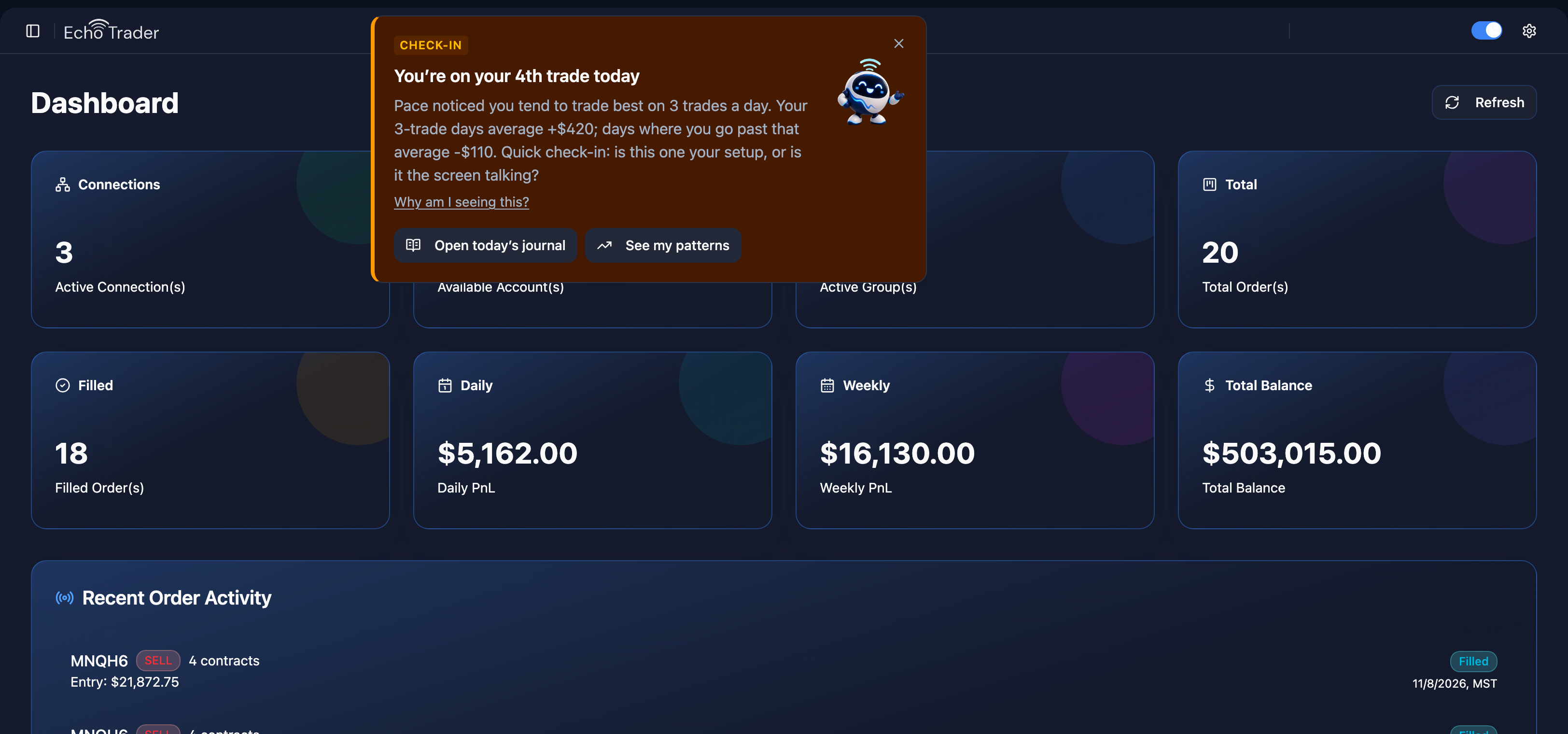
Every nudge has a Why am I seeing this? link. It opens What Pace watches for with that nudge's row highlighted, so you can see the exact trigger and switch it off if it isn't useful to you. Asking why doesn't dismiss the nudge.
Nudges
A nudge is a short card from Pace. Each one names what he saw, in your numbers, and offers an action: Open today's journal, See my patterns, or — on copier plans — Lock me out for today.
Pace is deliberately sparing: there's a limit on nudges per session, the same nudge won't repeat for a while even if it's still true, and there's always a gap between two nudges, so a burst of fills never becomes a burst of popups. Dismissing a nudge closes it. If the same thing still applies later, Pace may bring it up again once that nudge's wait is over. To stop a kind of nudge altogether, turn it off in Settings. Achievement celebrations don't count against the limit.
Every nudge is kept in AI Coach → Coach History, so you can come back to one later.
Live nudges or a session debrief, by plan
Live nudges need a live broker connection to react to. Plans without the copier get the same coaching as a session debrief instead, as soon as your orders sync.
| Plan | Nudges | Delivery |
|---|---|---|
| Free | One insight a week, earned by journaling 3 days that week | After your orders sync |
| Journal Pro | The full debrief set | After your orders sync |
| Basic / Premium | Everything, including the live-only nudges (tilt, revenge trading, drawdown, protecting a green day) | Live, while you trade |
On Free, the AI Coach page tells you how many more days you need to journal this week to unlock that week's insight. On debrief plans the page says so up front, so if you never see a live nudge you know that's how your plan works.
Settings
Under AI Coach → Settings → General:
- Coaching on — turn Pace off entirely, including achievements.
- Quiet mode — no popups while you trade; nudges still collect in Coach History.
- Celebrate achievements — the popup when you unlock something.
- Play a sound — a short chime when a nudge pops up, so you notice it with Echo Trader in a background tab. Click Hear it to try it. Browsers only play sound once you've clicked something on the page, which you almost always have mid-session.
Lock me out
Sometimes the right trade is no trade. On Basic and Premium, Pace can lock you out for the rest of the session:
- From a nudge, with Lock me out for today.
- Any time, with the Lock me out button on Account Management.
When you confirm, Echo Trader flattens your open positions and keeps your accounts flat until the trading session ends at 5pm ET: copying is paused, working orders are cancelled, and any position opened during the lockout — including one you place by hand at your broker — is closed. That's the point: it's a commitment you can't talk yourself out of at 2pm.
You're asked to confirm what you're agreeing to before the first lockout, and to re-confirm every 90 days.
Echo Trader doesn't lock your account at the broker. An order placed directly at your broker still goes through, and Echo Trader closes it as soon as it sees it. To lock just one account or one group for a set time, see Lock a Single Account and Lock a Group.
Auto lockout
On Basic and Premium, AI Coach → Settings → Auto lockout sets limits that lock you out for you, so the decision is made before the session starts. Leave a box blank to turn it off.
- Losing trades, Trades and Winning trades — a whole number from 1 to 50.
- Lock me out everywhere when a broker limit closes an account — uses the daily loss limit and profit target set in each account's Risk Management on Account Management. Your broker closes that account when it hits one; Echo Trader then locks you out on every account.
Limits are per account: when any one account reaches one, Echo Trader closes every position on every account and locks you out until 5pm ET, the same as Lock me out. The banner then names the limit and the account that hit it.
Lowering a limit or adding one takes effect now. Raising or removing one waits until the next session, so it can't be loosened in the middle of a bad day. The card shows the change that's waiting and when it starts. You tick a box to confirm before the first save, and again every 90 days to keep it on.
Echo Trader counts trades while it's connected, so a lockout lands within a few seconds of the trade that trips it. The Auto lockout button above the accounts table on Account Management shows your current limits.
Achievements
Achievements mark real milestones, pulled from the same history as everything else. They live in AI Coach → Achievements and come in three tiers of rarity:
- 🥉 Bronze — the everyday milestones.
- 🥈 Silver — the ones that take a while.
- 🥇 Gold — the rare ones.
When you unlock one it's celebrated on screen, scaled to its rarity, and you can share a card for it. To share one later, click the share icon on any unlocked tile in the Achievements tab. If you earned some while you were away, you get a single catch-up summary the next time you sign in instead of a string of popups.
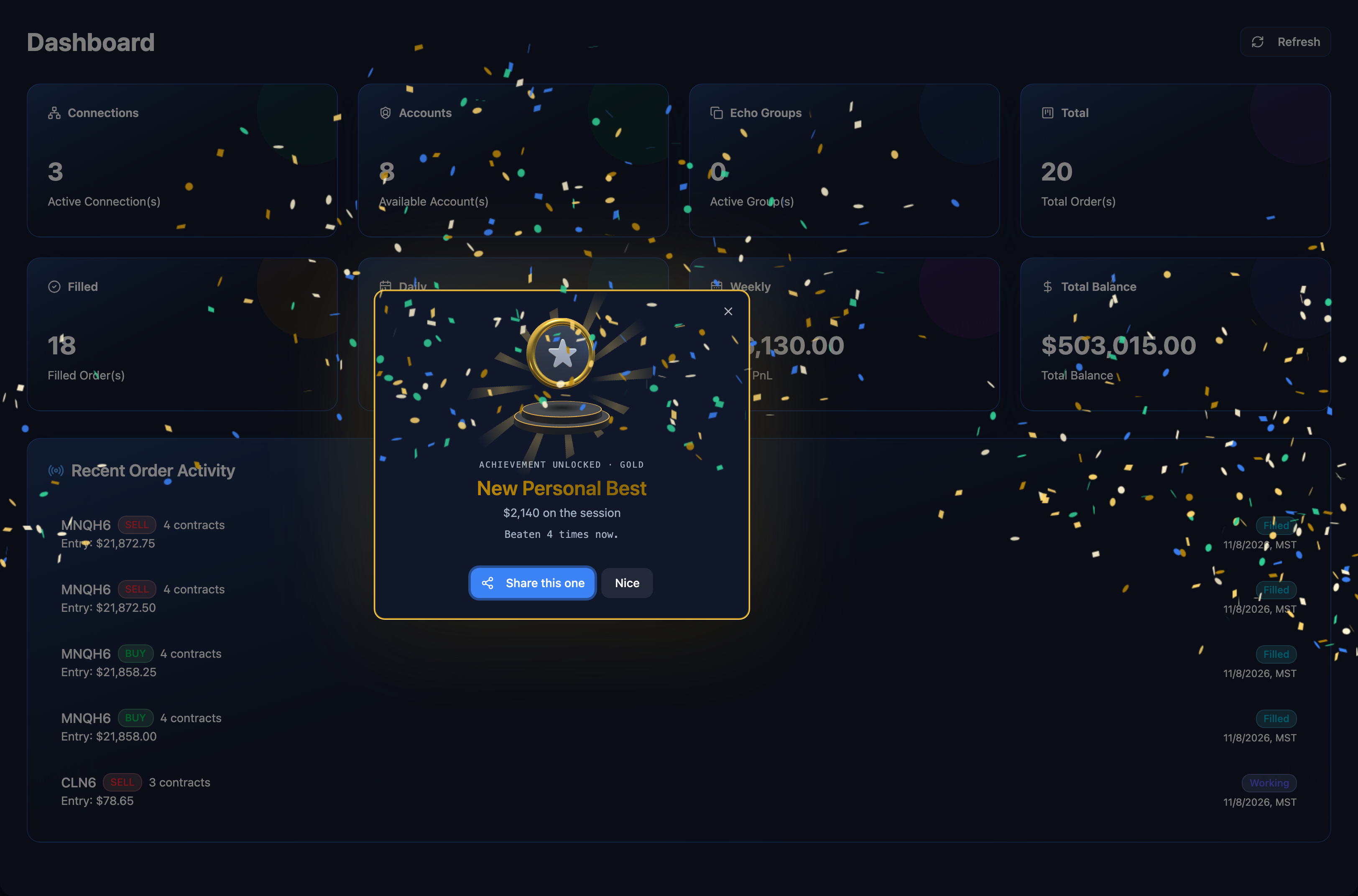
They're grouped into tracks: money days, weeks and months, personal records, consistency, discipline, journaling, recovery, and copy trading. A few examples:
| Achievement | What earns it |
|---|---|
| First Green Session | Finish a session in the green |
| $500 → $50,000 Day | Close a session up that much across all accounts |
| First Green Week / Month | Finish a week or calendar month green |
| New Personal Best | Beat your best trading day ever |
| Green Session Streaks | Finish several sessions in a row in the green |
| Journal Streaks | Journal trading days in a row — weekends don't break a streak |
Free accounts get a starter set that spans every category — your first journal entry, first green session, a $500 day, a 3-day journal streak and a disciplined day. Paid plans unlock the full catalogue.
Related
- Monthly Report — your month written up, including a recap of what Pace saw.
- Journaling — the journal Pace reads.
- Journal Pro — the full coach without the copier.
- Metrics — the underlying performance numbers.