Monthly Trading Report: Your Month, Written Up
Reports
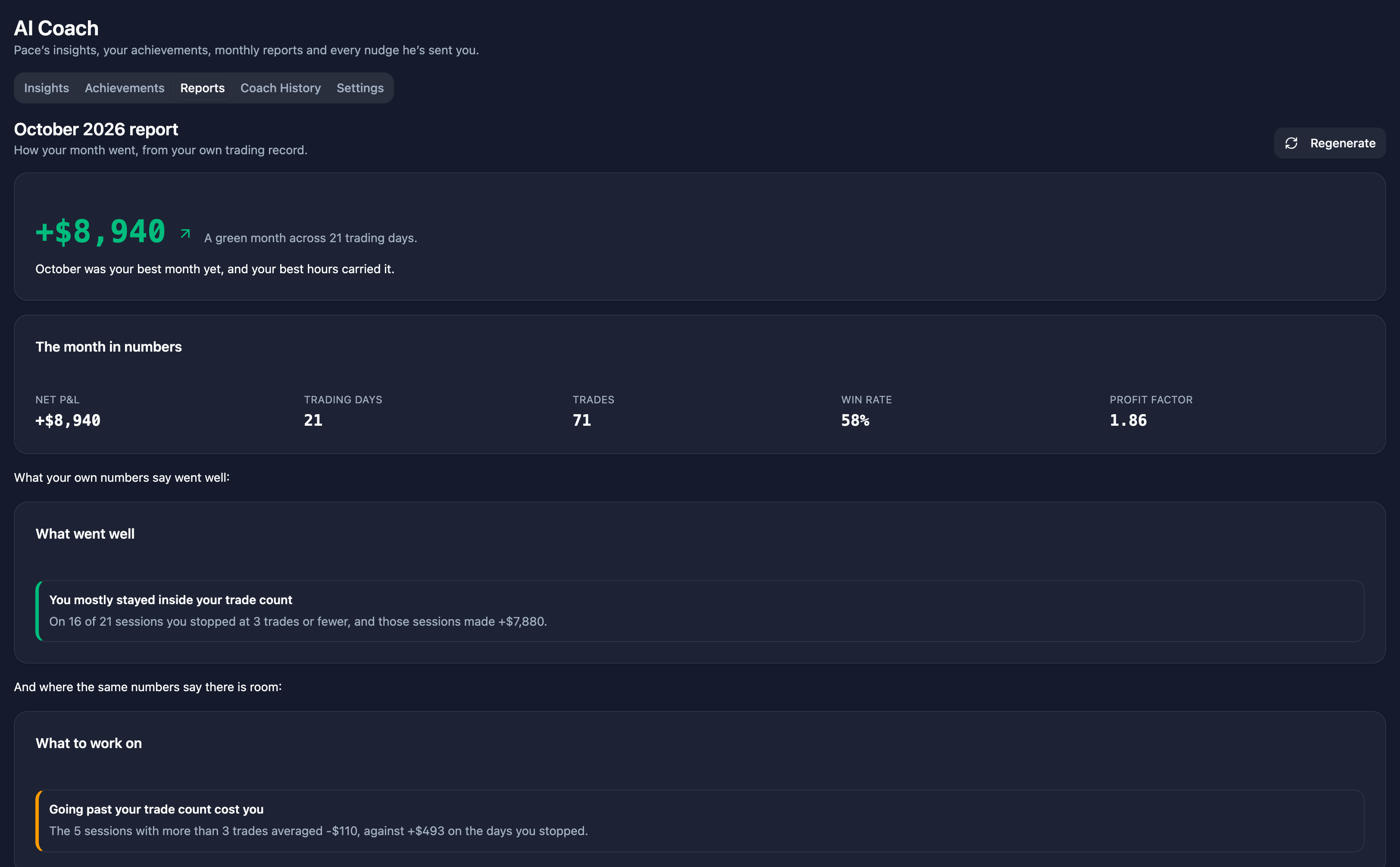
Your monthly trading report lives in AI Coach → Reports. It pulls your month together in one document: how it went, what your records were, which patterns showed up, and what to work on next.
A month becomes available once it is over. You can't generate a report for the month you're still trading.
Reports are generated on demand
There is no queue and no batch job waiting for the 1st of the month — which is just as well, since the 1st regularly lands on a weekend. Opening the report generates it. You asked for the report by opening the page; being made to click Generate your report first would just be a chore.
The first thing a generation does is sync your trades for the month, so the report is built from current data rather than whatever last happened to land. You'll see "We're syncing your trades for the month first, then putting the report together" while it works. That sync is also the report's health check — it is how Echo Trader knows whether it saw your whole month.
When a connection isn't connected
If a broker connection can't be synced — an expired token, usually — the report would be built from an incomplete month, so you get told before that happens, along with which accounts need attention. You have three choices:
- Reconnect — go to Connections, reconnect, and come back. This is the one that gets you the full report.
- Try again — if you've just reconnected in another tab.
- Generate without it — build the report from what did sync. Useful when the account in question isn't one you traded that month.
An account that synced fine but returned no trades is not a failure. Plenty of connected accounts simply aren't traded in a given month, and sending you off to reconnect a connection that is perfectly healthy would be worse than saying nothing. If nothing synced for the month, the page says so plainly — "Nothing synced for March yet" — rather than showing you an empty report.
Regenerating
Each generation builds the report again from a fresh sync, and there's a limit so it stays sustainable:
- While a report is partial or empty, regenerating is free, as many times as it takes. A thin report because a broker was disconnected is Echo Trader's shortfall, not yours — you shouldn't be stuck with the worse version because you were in a hurry the first time.
- Once a report has been built from a clean sync, you get one manual regeneration. Past that, reach out to support.
What's in the report
Every plan gets the shape of the month:
- Headline — net P&L, trading days, and the verdict on the month.
- Key numbers — net P&L, trading days, total trades, win rate.
- Equity curve and calendar — the month's cumulative P&L and its day-by-day calendar.
- Records — what the month did to your personal bests.
- Strengths and what to improve, and what to focus on next month.
Journal Pro, Basic and Premium add the analysis behind those numbers:
- Time of day and day of week performance.
- Hold time and contract size analysis.
- Discipline and behaviour for the month.
- Coach recap — what your coach flagged over the month, and how you responded.
- Community benchmark and the top-decile comparison — how your month reads against the Echo Trader community and against its best traders.
Basic and Premium additionally get:
- Your rank in the community for the month.
- Per-account breakdown — the month account by account.
Filtering The month in numbers (Journal Pro, Basic and Premium): above the table, pick connections, accounts, an Echo group or contracts, and click Apply. The table is worked out again for just those trades, including last month and the 3-month average, and its title says what it's filtered to. Only that table changes: Pace's write-up and the rest of the report still cover all your accounts. Filtering works on your last 3 months' reports, because older trades are no longer kept in enough detail for win rate and average winner or loser.
On the free tier, key numbers are limited to the four headline figures, there's no month-over-month comparison, and you see the single most important strength and improvement with an honest count of how many more were found ("4 more") rather than a page pretending there were none.
The written recap
On paid plans the report opens with a written summary of your month. Free accounts get a summary assembled from your numbers directly — which is also what paid plans fall back to if the writing step is unavailable, so the report always arrives.
What leaves the platform to produce that summary is a deliberately short list. It is aggregated figures about the month only: no name, no email, no account numbers, no identifiers of any kind, and no journal text — a journal note can contain anything you typed, including your own name, so journal free text is never sent. A new metric added elsewhere in Echo Trader does not reach that step until someone adds it to that list on purpose.
Your archive
Past reports stay in AI Coach → Reports as a row of month buttons, newest first, so you can read back through your months. The archive survives a lapsed subscription — exactly like your journal and your metrics. Deleting your account deletes every report along with it.
The monthly email
On the 1st of each month Echo Trader emails you a short note titled "See how October went" (or whichever month just ended) with a link straight to that month's report. The report is built when you open it — that's when your trades are synced — so the email tells you that rather than claiming the report is already waiting. It's one message per person — never a BCC blast — and the send is tracked per month, so you can't be emailed twice for the same month.
Every account gets this email by default. To stop receiving it, open Profile → Notifications and untick Monthly performance report. Your reports keep generating either way — you just won't be emailed about them, and you can still open any month from AI Coach → Reports.
Related
- AI Coach — Pace's nudges and achievements, which the coach recap is drawn from.
- Metrics — the same performance data, live.
- Journaling — the journal behind the discipline and behaviour sections.
- Free Tier and Journal Pro — what each plan's report includes.